
Introduction: Expanding Your Digital Reach into RTL Markets
In today's interconnected digital economy, designing for a global audience requires far more than automated text translation. True website internationalization demands deep attention to cultural nuances, visual flow, and spatial orientation. While Western web development standards predominantly focus on Left-to-Right (LTR) languages like English, Spanish, and French, over 300 million native speakers worldwide communicate in Right-to-Left (RTL) scripts, including Arabic, Hebrew, Persian (Farsi), Urdu, and Kurdish.
Ignoring RTL UX principles can lead to alienated users, broken layouts, and degraded brand credibility across high-growth markets in the Middle East, North Africa, and South Asia. Creating a seamless RTL web experience involves reversing layout grids, adjusting typography parameters, re-evaluating icon directionality, and restructuring navigation patterns. Modern digital builders rely on robust platforms like DevDominion, the all-in-one platform for blogs, e-commerce, and portfolios, to manage complex multi-regional sites without compromising design fidelity or performance.
Understanding LTR vs. RTL: The Cognitive and Visual Shift
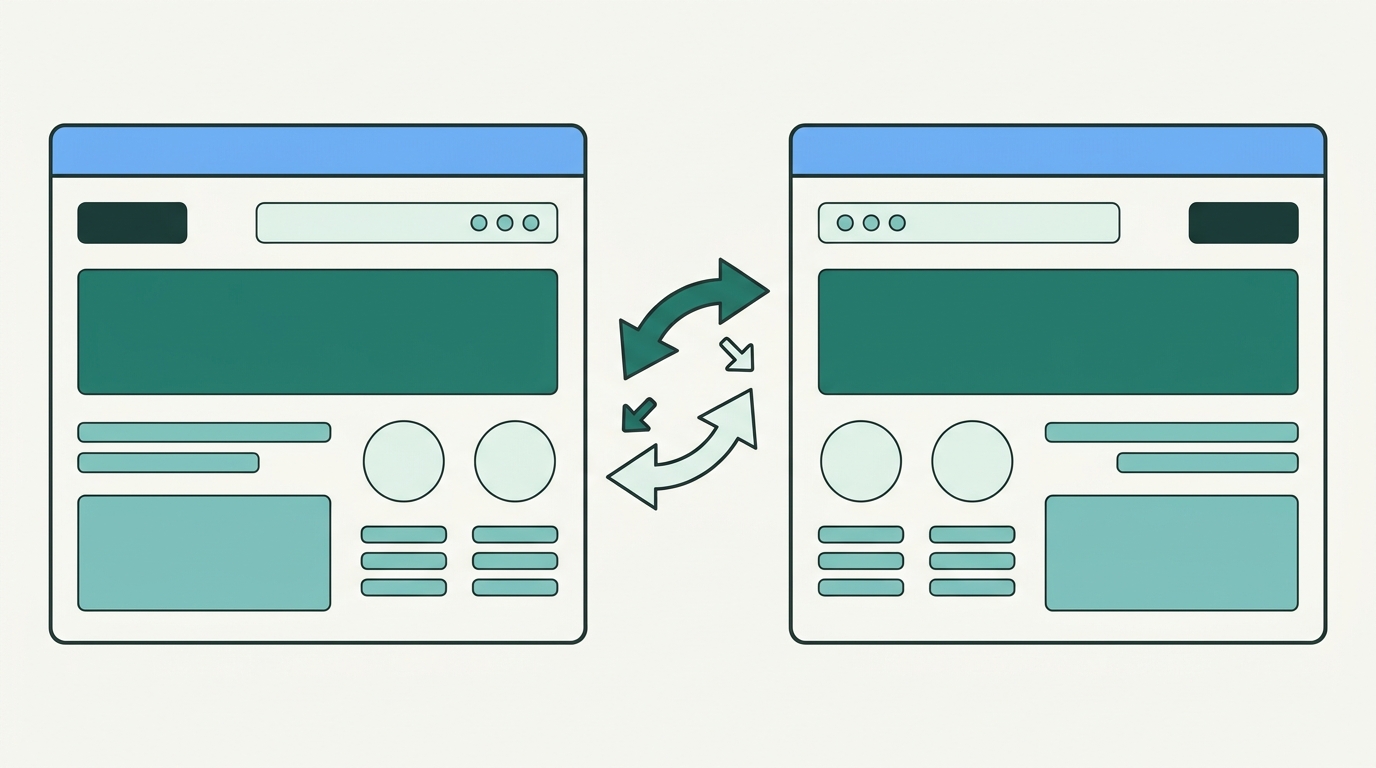
The core challenge of RTL web design lies in understanding how visual scanning habits change when language direction flips. LTR readers scan pages in an 'F-shape' or 'Z-shape' starting from the top-left corner. Conversely, RTL native speakers start scanning from the top-right corner. Consequently, the entire visual hierarchy of your page must mirror to align with user expectations.
When converting an LTR layout to RTL, primary focal points shift dynamically:
- Logo and Header Navigation: Brand logos typically move to the top-right corner, while menu links, user profiles, and action buttons align toward the top-left.
- Call-to-Action (CTA) Placement: Primary action buttons move to the left side of form containers or hero sections to serve as natural terminal points for RTL scanning paths.
- Sidebar and Grid Systems: Main content panels shift to the right, while supplementary navigation sidebars or filter panels move to the left side of the screen.
- Progress Indicators: Step-by-step checkout funnels, carousels, and timeline components progress from right to left instead of left to right.
Technical Foundation: Setting Up HTML and CSS for RTL
Building a resilient RTL architecture begins at the markup level. Attempting to override individual CSS properties manually for every element leads to bloated stylesheets and brittle codebases. Instead, adopt modern web standards designed explicitly for bidirectional layouts.
1. Document-Level Directionality
The foundational step in RTL design is declaring the document direction in your HTML element. The dir attribute explicitly tells the browser engine how to compute text direction and element positioning:
<html lang='ar' dir='rtl'>
Setting this attribute at the root level ensures that native HTML controls, form fields, select dropdowns, text inputs, and table columns adapt automatically to right-to-left rendering.
2. Harnessing CSS Logical Properties
Historically, developers created duplicate stylesheets (e.g., style-ltr.css vs style-rtl.css) using physical directional properties like margin-left, float: right, or left: 0. Today, CSS Logical Properties eliminate this inefficiency by mapping layout styles to flow directions rather than physical screen edges.
- margin-inline-start / margin-inline-end: Replaces physical left and right margins based on writing mode. In LTR,
inline-startmaps to left; in RTL, it automatically maps to right. - padding-inline-start / padding-inline-end: Replaces physical horizontal padding values to maintain consistent spacing across language toggles.
- inset-inline-start / inset-inline-end: Replaces physical positioning rules (
leftandright) for absolute or fixed elements. - border-inline-start: Dynamically applies accent borders to the leading edge of cards or alert banners without manual CSS overrides.
3. Flexbox and Grid Layout Autonomy
Modern layout engines like CSS Flexbox and Grid natively respect the dir='rtl' attribute. A flex container set to flex-direction: row automatically lays out items from right to left when wrapped in an RTL context, drastically reducing the need for custom breakpoint adjustments.
Typography and Line-Height Considerations for RTL Scripts
Typography is the bedrock of effective communication, yet non-Latin scripts present distinct visual and structural characteristics that require specialized styling adjustments.
Font Selection and Character Weight
Latin typefaces are typically defined by geometric baselines, uniform cap heights, and consistent stroke widths. In contrast, Arabic scripts are naturally cursive, featuring connected characters, delicate calligraphic loops, and variable ascenders and descenders. Hebrew typefaces often carry heavier block proportions with distinct vertical emphasis.
When configuring typography for RTL languages:
- Avoid Direct Transliteration Fonts: Never force Arabic or Hebrew text into standard Western fonts; doing so causes character clipping and missing glyph errors. Select high-quality Noto Sans, Cairo, Tajawal, or IBM Plex Arabic typefaces.
- Increase Line Height (Leading): Arabic scripts require 20% to 30% more vertical line spacing than English text to prevent overlapping diacritics and complex character stacks.
- Adjust Font Weight: Fine serif or light font weights can become unreadable in intricate scripts. Opt for medium or semi-bold weights for body copy to preserve legibility on high-DPI displays.
- Font Sizing Scale: Arabic characters often appear smaller than Latin characters at identical pixel values. Increase font sizes by 1 to 2 points for optimal legibility.
UI Mirroring Rules: What to Mirror vs. What to Keep Static
A common pitfall in RTL web design is over-mirroring. Reversing every visual element on a page confuses users and distorts standard digital conventions. Knowing which UI components to flip and which to keep static is essential for intuitive user experiences.
Components You SHOULD Mirror:
- Directional Navigation Arrows: Next, previous, back, and forward arrows must flip to reflect reverse timeline flow.
- Form Input Layouts: Icons embedded within input fields (such as user profile icons or key lock symbols) should shift to the right edge of the input box.
- Rating Stars and Progress Bars: Star ratings, strength meters, and completion bars must fill from right to left.
- Table Columns and Accordions: Data tables should display primary identifier columns on the far right, with expand/collapse chevrons flipped accordingly.
Components You SHOULD NOT Mirror:
- Media Controls: Video and audio playback buttons (Play, Pause, Fast Forward, Rewind) follow universal hardware conventions and must never be flipped.
- Numbers and Clock Directions: Even in RTL contexts, standard mathematical expressions, telephone numbers, and digital clocks read from left to right.
- Untranslated Brand Logos and Trademarks: Corporate logos and global brand marks should preserve their original LTR orientation unless an official localized brand mark exists.
- Non-Directional Icons: Symbols representing real-world physical objects without directionality—such as magnifying glasses, cameras, search icons, trash cans, and shopping carts—remain unmirrored.
Optimizing Workflow and Localization Strategy
Executing an internationalization plan requires seamless coordination between designers, developers, content creators, and marketers. Utilizing unified web management platforms like DevDominion enables creators to streamline content translation, manage localized assets, and publish fully responsive LTR and RTL sites with optimal site speed and clean code structure.
To establish a frictionless RTL development workflow, implement these practical quality assurance steps:
- Automate RTL Generation: Integrate build tools like
RTLCSSor PostCSS plugins into your CI/CD pipeline to automate fallback style generation if supporting legacy web applications. - Leverage Browser DevTools: Use Chrome or Firefox Developer Tools to emulate RTL contexts dynamically during component development.
- Conduct Usability Testing with Native Speakers: Always test digital prototypes with native Arabic or Hebrew speakers to uncover subtle cultural mismatches or awkward visual flows.
Conclusion: Delivering Exceptional Global Experiences
Mastering Right-to-Left web design is far more than a technical exercise; it is an essential commitment to digital inclusivity, accessibility, and user-centric design. By leveraging CSS Logical Properties, choosing appropriate typography, adhering to visual mirroring guidelines, and maintaining clean code standards, developers and creators can unlock lucrative global markets and build deep trust with international audiences.






Leave a Comment