
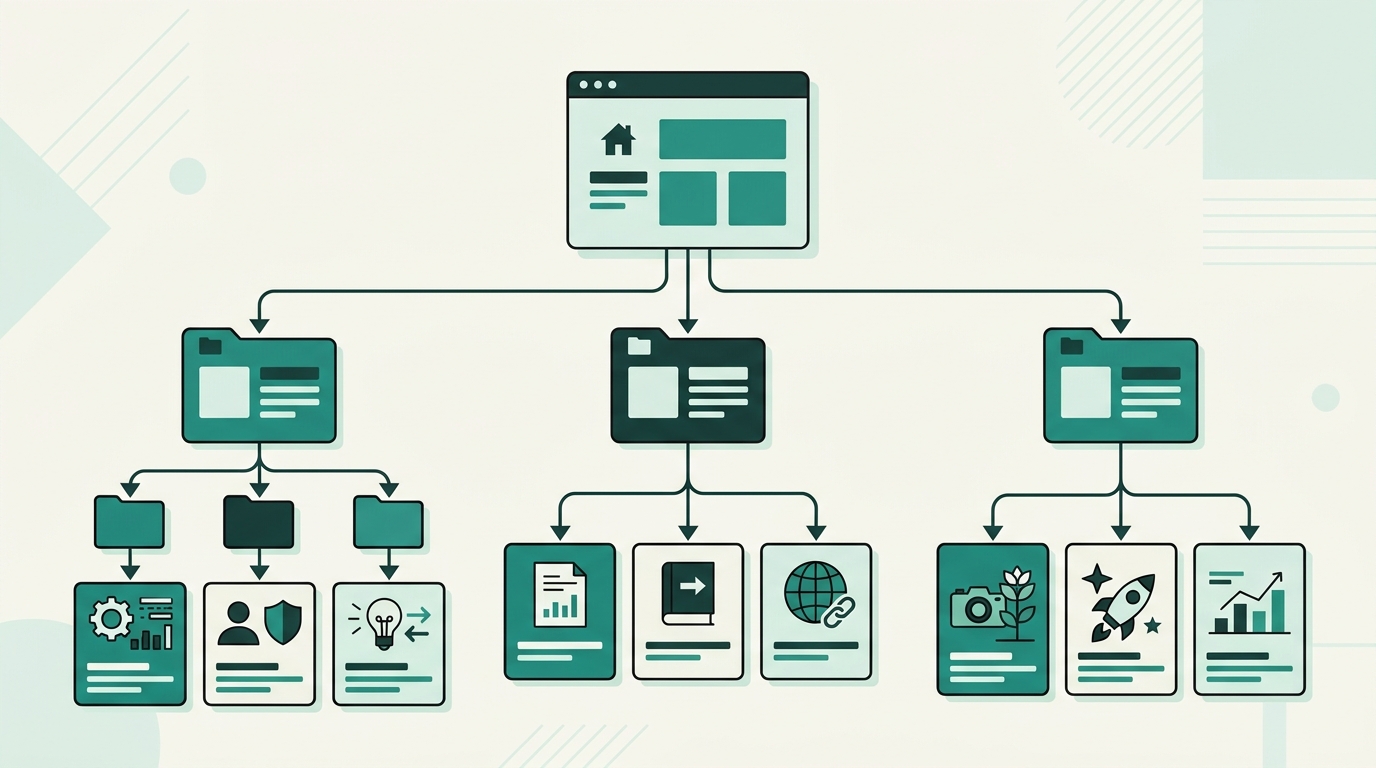
When readers land on your blog, what do they experience? Is your content organized like a well-curated library, or does it feel like a cluttered digital junk drawer? For content creators, developers, entrepreneurs, and digital marketers, how you structure your blog categories directly dictates both user experience (UX) and search engine optimization (SEO). A thoughtful content taxonomy guides human visitors seamlessly to the information they need while helping search engine crawlers understand your site’s topical authority. In this comprehensive guide, we will break down exact strategies for structuring your blog categories for optimal navigation, improved crawlability, and higher conversions. Whether you are launching a fresh publication or restructuring an existing content hub on an all-in-one platform like DevDominion, mastering category architecture is one of the highest-leverage improvements you can make to your digital growth strategy. Your blog’s structure serves as the architectural blueprint for your entire content strategy. Without clear boundaries and logical groupings, visitors quickly grow frustrated and click away, sending negative behavioral signals to search engines. Here is why getting your category hierarchy right is paramount: When visitors land on a specific blog post from a search engine result page (SERP), their immediate impulse after reading is often to discover related resources. Clear, visible category navigation enables seamless exploration. By making content discovery intuitive, you increase pageviews per session, lower bounce rates, and keep readers engaged longer. Google and other search engine bots crawl websites by following links. A well-organized, hierarchical category structure acts as a clear map. It helps crawlers understand the parent-child relationships between different pieces of content, pass page authority (PageRank) efficiently across your site, and index new posts faster. Modern SEO relies heavily on topical authority. Search engines evaluate whether your site comprehensively covers specific subject areas. When your articles are logically grouped into focused categories, search engines recognize your depth of knowledge in those core domains, boosting rankings across related search queries. One of the most frequent mistakes website managers make is misinterpreting the distinct roles of categories and tags. Treating them interchangeably leads to indexation bloat, duplicate content issues, and confused visitors. Categories represent the broad, high-level topics or chapters of your blog. Think of categories as the table of contents in a non-fiction book. Every single post on your blog should belong to at least one primary category, but rarely more than two. Categories are hierarchical, meaning they can feature parent and sub-category relationships. Tags, on the other hand, are granular keywords that describe specific details or micro-topics mentioned within a post. Tags act like the index at the back of a book. They link related posts across different categories that share a specific keyword or tool reference. Unlike categories, tags are not hierarchical and are entirely optional. For example, if you publish an article titled "Building a Next.js Portfolio", the category might be Web Development, while the tags could include Next.js, React, and Portfolio Design. Designing a category taxonomy requires balancing simplicity with comprehensive coverage. Follow these core principles to establish a scalable navigation framework: Resist the temptation to create dozens of top-level categories. A clean navigation menu should feature between 5 and 7 main categories. Limiting your main categories forces you to group content logically without overwhelming human cognition or cluttering your header navigation. Borrowed from management consulting, the MECE principle stands for Mutually Exclusive, Collectively Exhaustive: Avoid deep navigation trees with multiple nested sub-categories. A shallow site hierarchy ensures that any article is reachable within 3 clicks from the homepage. A standard structure consists of: Home > Main Category > Sub-Category (Optional) > Blog Post. Restructuring or creating categories should never be done based on guesswork. Use a data-driven approach to map out your architecture: Start by auditing your existing content library or planned editorial roadmap. Conduct keyword research to identify broad search terms with high search volume that align with your core business pillars. These broad terms make ideal candidates for top-level category names. List all your planned or published article titles on index cards or digital whiteboards. Group related titles into clusters. Review these clusters to see if clear, distinct umbrella themes emerge organically. If a cluster contains only one or two posts, merge it into a broader category. Category names should be clear, concise, and descriptive. Use plain language that your target audience actually searches for rather than obscure internal jargon. For instance, use Content Marketing instead of Thought Leadership Insights. Managing taxonomy, custom URL structures, and breadcrumbs becomes vastly simpler when using modern content platforms. Solutions like DevDominion offer built-in tools for managing blogs, e-commerce, and portfolios within a single unified workspace, enabling seamless taxonomy management without complex plugin configurations. Once your category hierarchy is planned, implementing technical best practices ensures search engines maximize the value of your category landing pages: Even seasoned marketers fall into common traps when managing blog taxonomy. Ensure you avoid these costly mistakes: Structuring your blog categories effectively is not just an aesthetic decision; it is a foundational growth strategy. By establishing a logical, shallow taxonomy based on user intent and SEO best practices, you create a frictionless experience for readers while signaling strong topical authority to search engines. Take time today to audit your existing content, consolidate overlapping topics, and refine your category navigation. With clear structure and robust hosting tools, your blog will transform into a high-performing engine for organic traffic, engagement, and conversion.Why Blog Category Structure Is Critical for SEO and UX
1. Enhanced User Experience and Reduced Bounce Rates
2. Improved Search Engine Crawling and Indexation
3. Establishing Topical Authority
Categories vs. Tags: Understanding the Fundamental Difference
What Are Blog Categories?
What Are Blog Tags?
The Golden Rules of Blog Category Architecture
1. Limit Your Top-Level Categories (The Rule of 5 to 7)
2. Apply the MECE Framework
3. Keep Depth Shallow (Max 2 Levels Deep)
Step-by-Step Guide to Planning Your Category Taxonomy
Step 1: Conduct Content and Keyword Research
Step 2: Perform Card Sorting Exercises
Step 3: Define Clear Naming Conventions
Step 4: Choose the Right Content Infrastructure
Technical SEO Best Practices for Category Navigation
example.com/blog/web-development/. Avoid using dynamic session IDs or numeric parameters in category slugs.5 Common Category Structuring Mistakes to Avoid
Conclusion: Audit and Restructure Your Blog Today







Leave a Comment